Introduction
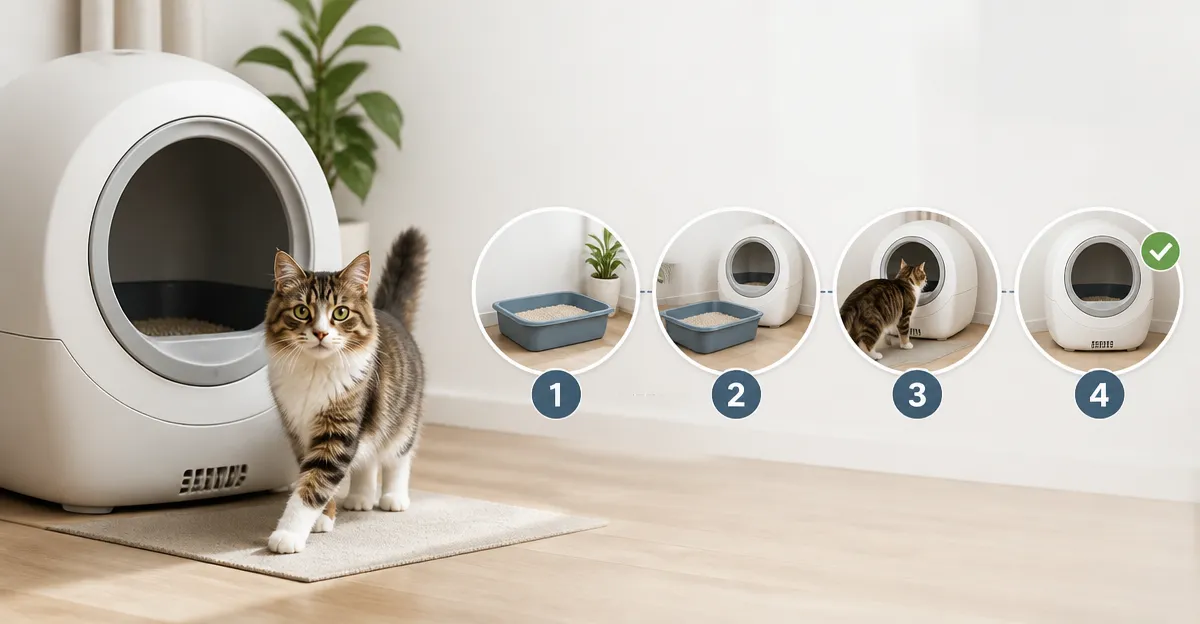
This guide explains how to train a cat to use an automatic litter box without causing anxiety or confusion. Readers will learn practical steps, safety considerations, and how to optimise the device for multi‑cat households. The process reduces daily scooping, improves odor control, and supports feline health monitoring. By following the outlined method, cat owners can achieve a seamless transition that benefits both pet and owner.
What You’ll Need
A reliable automatic litter box, a stable power source, a Wi‑Fi network (2.4 GHz), and basic cleaning supplies are required. Optional accessories such as litter attractant, extra waste bags, and a non‑slip mat can enhance comfort. The following products have proven effective for the steps described below.
Step 1: Choose the Right Automatic Litter Box
Selecting a model that matches the cat’s size, household traffic, and budget is essential. The ovesong Automatic Litter Box offers an open‑top design, dual safety sensors, and a 15 L sealed waste bin for up to several days of use. Priced at $99.98 with a 3.9‑star rating from 225 reviews, it provides value for single or multiple cats seeking spacious entry.
For larger cats or multi‑cat families, the Cumrige Automatic Litter Box features a 95 L drum capacity, a 15 L waste bin lasting up to 15 days, and a quieter motor. It costs $199.94 and holds a 4.2‑star rating from 3,763 reviews, making it suitable for heavy‑use environments. Both models include smart app control, allowing owners to schedule cleaning cycles and receive alerts.
Step 2: Position the Box Strategically
Place the litter box in a quiet, low‑traffic area where the cat feels safe. Avoid direct sunlight, drafts, and proximity to food or water dishes. The open‑top design of the ovesong model reduces claustrophobia, while the Cumrige’s larger footprint requires at least a 2‑foot clearance on each side.
Ensure the power cord is out of reach of curious paws and that the Wi‑Fi router is within 10 meters for stable connectivity. If the floor is slippery, a non‑slip mat can prevent the unit from shifting during cleaning cycles.
Step 3: Introduce the Cat to the New Box
Begin by allowing the cat to explore the stationary box without activating the cleaning mechanism. Remove the waste tray and place a familiar litter type inside; cats often prefer clumping litter that mimics natural substrate. Let the cat investigate for several minutes while offering treats nearby.
After the cat appears comfortable, re‑install the waste tray and activate a manual cleaning cycle using the app. Observe the cat’s reaction; the dual safety sensors on both the ovesong and Cumrige models pause operation if movement is detected, preventing accidental contact.
Step 4: Configure Settings for a Stress‑Free Routine
Use the companion app to set cleaning intervals that align with the cat’s typical bathroom schedule. For most cats, a 5‑minute delay after exit allows the litter to settle before the rake engages. The UPFAS Smart Litter Box provides weight monitoring, enabling owners to track usage patterns and detect health anomalies.
Set the noise level to “quiet” mode if available; the UPFAS operates below 35 dB, comparable to a whisper, which minimizes startle responses. Enable push notifications for full‑bin alerts so the waste compartment is emptied before odors develop.
Step 5: Monitor and Adjust Over the First Two Weeks
During the acclimation period, observe the cat’s willingness to use the box and note any hesitations. If the cat avoids the device, consider temporarily disabling the automatic cycle and allowing manual cleaning until confidence builds. The Mintakawa model (Mintakawa Smart Litter Box) includes a step‑by‑step tutorial within its app, which can guide owners through fine‑tuning sensor sensitivity.
Adjust litter depth according to the manufacturer’s minimum and maximum lines; insufficient depth may cause tracking, while excess depth can impede the rake. Regularly replace the waste bags supplied with each unit to maintain odor control.
Tips & Pro Tips
- Maintain a consistent feeding schedule; cats often use the litter box shortly after meals.
- Use a litter attractant spray on the first few uses to encourage exploration.
- Keep the surrounding area clean to prevent litter spillage from discouraging use.
- If the cat appears frightened by the cleaning sound, increase the delay timer by 2‑3 minutes.
- For multi‑cat homes, place an additional traditional box nearby during the transition phase.
Troubleshooting
Problem: Cat refuses to enter the box.
Solution: Verify that the safety sensors are not constantly triggered by nearby objects. Remove any toys or cords that may be detected as movement.
Problem: Excessive odor despite sealed waste bin.
Solution: Replace the waste bag more frequently and ensure the sealed cover is properly latched. Consider using a deodorizing gel as recommended for the Ellenpent model (Ellenpent Open‑Top Litter Box).
Conclusion
Training a cat to use an automatic litter box involves careful product selection, strategic placement, gradual introduction, and ongoing monitoring. By following the steps outlined in this guide, owners can achieve a low‑maintenance solution that enhances hygiene, reduces odor, and provides valuable health insights. Consistency and patience remain the most important factors for success.
Products Mentioned in This Guide
Frequently Asked Questions
How do I introduce my cat to an automatic litter box without causing anxiety?
Place the box next to the cat's current litter, keep the lid open initially, and reward the cat with treats each time it uses the box.
What safety features should I look for in an automatic litter box?
Choose a model with dual sensors to detect the cat's presence and a sealed waste bin to prevent accidental exposure to waste.
Can an automatic litter box work in a multi‑cat household?
Yes, select a box with a larger waste capacity and a fast cleaning cycle to accommodate multiple cats.
Do I need a special power source or Wi‑Fi setup for these devices?
A stable 110‑120 V outlet and a 2.4 GHz Wi‑Fi network are required for power and app connectivity.
Are accessories like litter attractant or non‑slip mats necessary?
They are optional but can improve comfort and encourage consistent use, especially for hesitant cats.