Introduction
Automatic litter boxes have transformed cat care, but they can encounter jams, sensor glitches, unpleasant odors, or power failures. This guide explains how to diagnose and resolve these issues quickly, ensuring a clean, quiet environment for both owner and feline. By following the step‑by‑step instructions, one can extend the lifespan of the unit and maintain optimal performance.
The procedures described apply to most popular models on the market, including the Cumrige Self-Cleaning Litter Box, the Vivirata Self-Cleaning Litter Box, the Mintakawa Smart Litter Box, the Lohhuby Smart Litter Box and the Neakasa M1 Plus Litter Box. Understanding the underlying mechanisms—motor, sensors, waste bin and Wi‑Fi connectivity—will make troubleshooting less intimidating.
What You’ll Need
- Soft microfiber cloths
- Isopropyl‑based cleaning spray (optional)
- Phillips screwdriver (usually #2)
- Replacement waste bags (compatible with your model)
- Smartphone with the appropriate app installed
- Access to one of the recommended litter boxes for reference or spare parts
Step 1 – Verify Power and Reset the Unit
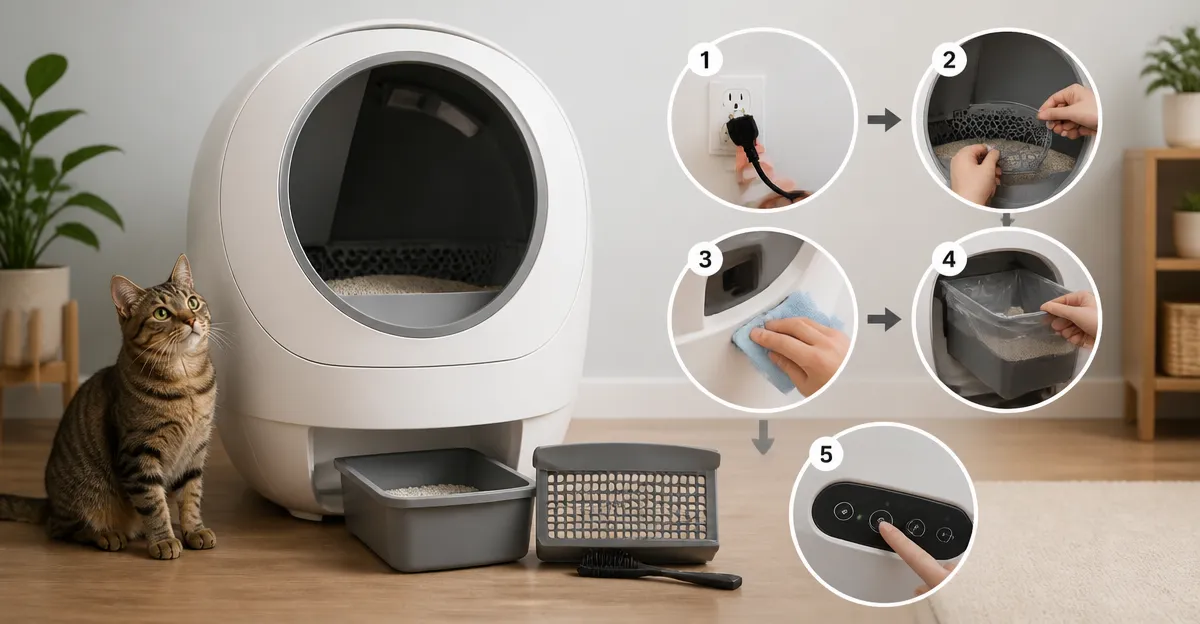
Before investigating complex faults, confirm that the device receives power. Unplug the unit, wait thirty seconds, then plug it back in. Many models, such as the Cumrige Self-Cleaning Litter Box, include a built‑in reset button near the power cord; press it for five seconds to reboot the internal controller.
Why this matters: a simple power cycle clears temporary firmware glitches that can cause the motor to stall or the app to lose connection. The Cumrige model offers a large 95 L drum capacity and a robust safety sensor, making it an ideal reference for resetting procedures.
Step 2 – Clear Mechanical Jams
If the drum does not rotate, a physical obstruction is likely. Remove the waste bin and inspect the roller for clumped litter or stray debris. The Vivirata Self-Cleaning Litter Box features a detachable drum that slides out without tools, simplifying jam removal.
Instructions:
- Turn off the unit and disconnect power.
- Slide the drum out according to the user manual.
- Use a soft brush to dislodge stuck litter; avoid metal tools that could damage the sensor.
- Re‑install the drum, ensuring it seats evenly.
- Run a test cycle from the app.
The Vivirata’s quiet motor and dual safety sensors reduce the likelihood of repeated jams, which is why it is recommended for households with multiple cats.
Step 3 – Calibrate Sensors and Resolve Errors
Infrared and weight sensors detect a cat’s presence and prevent the cleaning cycle from starting while the animal is inside. A common error is the “pinch” or “sensor fault” message. The Mintakawa Smart Litter Box provides an intuitive app that displays real‑time sensor status.
To recalibrate:
- Open the app and navigate to Settings → Sensor Calibration.
- Place a known weight (e.g., a 2 kg bag of cat litter) on the platform; the app should register the weight.
- If the reading is inaccurate, clean the sensor window with a dry cloth and repeat.
- For infrared sensors, ensure the lens is free of dust and that no reflective surfaces interfere with the beam.
Mintakawa’s low‑noise performance (below 35 dB) makes it easy to listen for abnormal sounds that indicate sensor misalignment.
Step 4 – Manage Odor and Leakage
Odor issues often stem from infrequent waste bag changes or a compromised seal. The Lohhuby Smart Litter Box incorporates an open‑top design with a sealed waste bin, reducing odor migration.
Best practices:
- Replace the waste bag every 3‑5 days for multiple‑cat households.
- Apply a thin layer of baking soda or a lavender‑scented powder to the litter to neutralize smells.
- Check the sealing ring for wear; the Lohhuby model’s anti‑pinch technology also prevents litter from spilling during cleaning cycles.
For severe odor, consider the Neakasa M1 Plus Litter Box, which features a 360° sensor array and a proprietary brush strip that locks in odor while the waste is sealed in a pull‑and‑wrap bag.
Step 5 – Perform Routine Maintenance
Regular upkeep prevents most breakdowns. Follow this schedule each month:
- Empty and clean the waste bin with mild soap; rinse and dry thoroughly.
- Wipe the interior drum and sensor windows with a microfiber cloth.
- Inspect the wheels and rollers for wear; replace if they show cracks.
- Update firmware via the app; both Cumrige and Neakasa push automatic updates that improve sensor algorithms.
- Run a manual cleaning cycle to verify smooth operation.
Choosing a model with easy‑access components, such as the Cumrige Self‑Cleaning Litter Box with its detachable waste trays, reduces the time spent on each maintenance session.
Tips & Pro Tips
- Place the unit on a level surface; an uneven floor can cause the drum to bind.
- Use the app’s “night mode” to delay cleaning cycles during low‑traffic hours, minimizing noise for sleeping cats.
- Keep the Wi‑Fi router within 10 feet of the litter box to avoid connectivity drops, especially for 2.4 GHz‑only devices.
- When introducing a new cat, keep the lid open for 48 hours and allow the animal to explore the interior before enabling automatic cleaning.
- Store spare waste bags in a dry cabinet; moisture can weaken the bag’s seal and lead to leaks.
Troubleshooting Quick Reference
| Problem | Possible Cause | Solution |
|---|---|---|
| Unit does not turn on | Power cord loose or outlet failure | Check outlet, reseat cord, reset power button. |
| Jamming during cycle | Clumped litter or foreign object | Clear drum, use low‑dust clumping litter. |
| Sensor error message | Dirty infrared lens or weight sensor drift | Clean lenses, recalibrate via app. |
| Persistent odor | Full waste bag or seal breach | Replace bag, inspect sealing ring. |
| App shows “offline” | 2.4 GHz Wi‑Fi instability | Move router closer, restart router, re‑pair device. |
Conclusion
By verifying power, clearing jams, calibrating sensors, managing odor and performing routine maintenance, one can keep an automatic litter box operating efficiently for years. The recommended models—Cumrige, Vivirata, Mintakawa, Lohhuby and Neakasa—offer complementary features that simplify each troubleshooting step. Implement the tips above, and cat owners will enjoy a cleaner home, quieter nights and more time for play.
Products Mentioned in This Guide
Frequently Asked Questions
Why does my automatic litter box stop cleaning after a few cycles?
Most units halt when the waste bin is full or the sensor is blocked; empty the bin and clear any litter debris, then reset the box.
How can I fix sensor errors or missed scoops?
Clean the infrared or weight sensors with a soft cloth, ensure no litter clumps cover them, and verify the unit is level.
What should I do if the litter box emits a strong odor?
Replace the waste bag, clean the interior with an isopropyl‑based spray, and check the carbon filter for saturation.
Why won’t the unit power on after a power outage?
Unplug the box, wait 30 seconds, then plug it back in and press the reset button (often near the power cord) to reboot the system.
How can I troubleshoot Wi‑Fi connectivity problems with the smart app?
Ensure the box is within range of your router, restart both the litter box and router, and re‑enter the Wi‑Fi credentials in the app.